
The award-winning productivity suite Microsoft 365 comes in several packages to suit the budgets and needs of various businesses. Each plan guarantees a 99.9% uptime and includes automatic updates and 24/7 support. Read on to learn which one is best for your company. Microsoft 365 plans
All Microsoft 365 business plans provide access to a suite of productivity tools with varying levels of application access based on the selected plan.
Introduction to Microsoft 365 Business Plans
Microsoft 365 Business plans are purpose-built to help small and medium-sized businesses thrive in today’s digital landscape. Each business plan combines essential productivity apps, robust security management offerings, and powerful collaboration tools, all designed to streamline your daily operations and protect your business and application data. Each plan also includes varying levels of email storage, OneDrive access, and collaboration tools. With options like Microsoft 365 Business Basic, Business Standard, and Business Premium, you can select the right mix of features and pricing to match your organization’s needs. Whether you’re looking for reliable business class email, access to desktop apps, or seamless teamwork with Microsoft Teams, Microsoft 365 business plans offer flexible solutions to support your growth. From basic cloud-based services to advanced compliance and security management, there’s a business plan tailored for every stage of your journey.
Quick answer (start here)
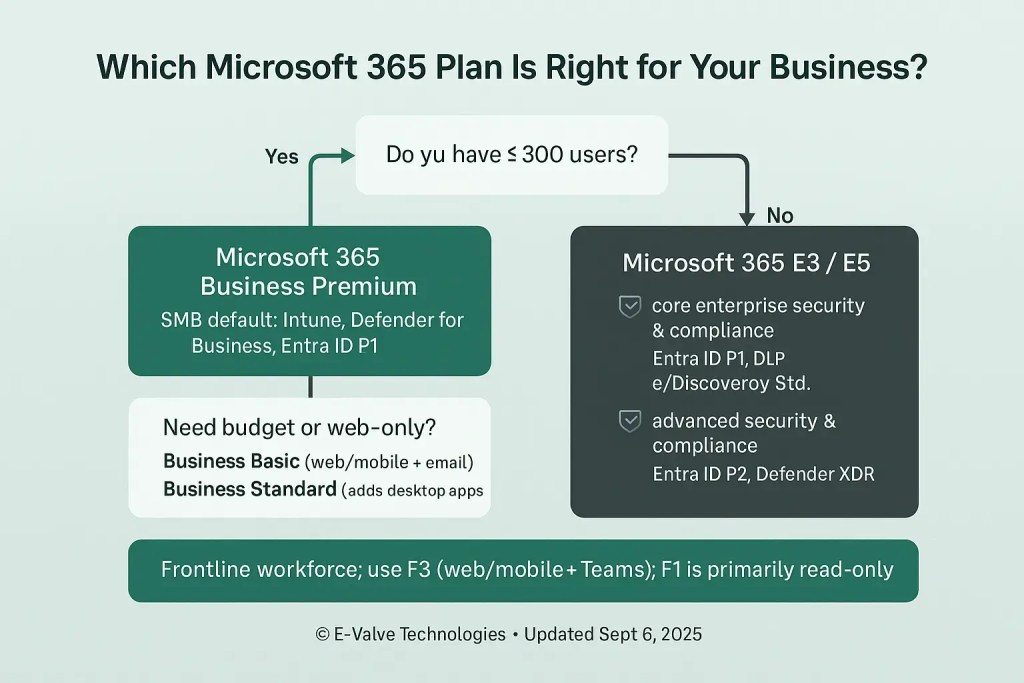
Most SMBs (1–300 users): Microsoft 365 Business Premium → full desktop apps, business email, Teams, advanced security, device management (Intune), Defender for Business, and Entra ID P1. This is the “secure-by-default” sweet spot for healthcare, legal, accounting, and nonprofit teams we support daily.
Budget/essentials: Business Basic (web/mobile apps + email + OneDrive/SharePoint) or Business Standard (adds desktop apps). Neither includes Intune; add security as needed.
Frontline staff (retail, field, volunteers): Use Frontline F3 for web/mobile apps and email; F1 is lighter (read-only docs) and no desktop apps.
>300 users or strict compliance/advanced security: Microsoft 365 E3 (core enterprise features, Entra ID P1) or E5 (advanced security & compliance: Entra ID P2, Defender XDR, etc.). Organizations with more than 300 users should consider subscribing to Microsoft 365 for enterprise plans. Note: many Enterprise SKUs are now offered with or without Teams. Enterprise agreement customers (typically with 250+ licenses) are eligible for volume licensing discounts and tailored purchasing options, and should consider enterprise plans for large organizations.
Nonprofits: Eligible orgs get steep discounts (e.g., Business Premium nonprofit staff pricing). Offers change—verify current grants/discounts.
What changed since our 2021 post?

Monthly billing options for Microsoft 365 generally cost about 5% more than yearly billing.
Current pricing & seat limits
Business plans: Business Basic ($6), Business Standard ($12.50), Business Premium ($22) per user/month (annual). Business plans are intended for up to 300 seats per plan family. Business Basic and Enterprise E1/F1 plans only include web and mobile apps.
Enterprise: Microsoft 365 E3 ($33.75) and E5 ($54.75) are commonly sold as “no Teams” SKUs in the US; “with Teams” variants exist and may be priced differently.
Teams bundling Many Business and Enterprise plans are now available with or without Teams, which can affect price and compliance posture. Check the exact SKU when purchasing.
Copilot for Microsoft 365: You can add Microsoft 365 Copilot to eligible plans for $30/user/month (annual). It brings AI assistance into Word, Excel, Outlook, PowerPoint, and Teams. Copilot Chat is available at no extra cost for users with Copilot-enabled licenses, not all tenants. The full Copilot license unlocks deeper integration and governance options. Microsoft 365 users can purchase any number of add-on services to enhance their implementation.
Plan comparison (2025): business premium and other options
Key inclusions to note
Business Premium includes full Intune device management and Entra ID P1 (for Conditional Access, MFA controls), plus Defender for Business and Defender for Office 365 Plan 1 (Safe Links/Attachments).
E5 adds Entra ID P2 and a full advanced security stack (Defender for Office 365 Plan 2, Defender for Endpoint, Defender for Identity, Defender for Cloud Apps) plus advanced compliance. Microsoft Purview compliance tools are included with E5 and certain add-ons, but not by default in Business Premium.
Frontline: F3 users have full create/edit in web/mobile; F1 is primarily read-only; neither includes desktop apps.
Key features and tools: Microsoft 365 apps and services
Microsoft 365 delivers a powerful suite of cloud-based productivity apps and services designed to help businesses operate efficiently and securely. At the heart of every business plan is Microsoft Teams, which streamlines collaboration and communication—whether your team is in the office or working remotely. Microsoft 365 business plans also support shared mailboxes and shared calendars, enabling teams to collaborate on email and scheduling efficiently. With Microsoft Loop, teams can co-author content in real time, share ideas, and keep projects moving forward without missing a beat.
For managing appointments and customer interactions, Microsoft Bookings offers an easy-to-use scheduling solution that integrates seamlessly with your calendar. The suite’s productivity apps—Word, Excel, PowerPoint, and Outlook—enable you to create impressive documents, easily create polished presentations, and simplify complex data with intuitive tools. Microsoft Editor helps ensure your communications are clear and professional, while Microsoft Forms and Planner provide data visualization and survey capabilities to support decision-making and project management.
Security is built in at every level, with features like malware filtering, advanced identity and access management, and robust security management offerings to protect your business and application data. Cloud storage ensures your files are accessible and safe, while anytime phone and web support means help is always available when you need it. Whether you’re editing professional looking videos with Clipchamp, managing team sites, or analyzing complex data, Microsoft 365 business plans offer all the tools you need to stay productive and secure.
Microsoft 365 Business Basic: Who is it for?
Microsoft 365 Business Basic is the ideal entry-level plan for small businesses or organizations with straightforward needs. This plan gives your team access to web and mobile versions of essential productivity apps like Word, Excel, and PowerPoint, so you can work from anywhere, on any device. With Microsoft Teams included, collaboration and communication are simple and secure, whether you’re in the office or remote. Business Basic also features business class email with a generous 50 GB mailbox, 1 TB of cloud storage per user, and built-in malware filtering to help keep your data safe. Plus, you’ll have access to anytime phone and web support, ensuring help is always available when you need it. If your business wants to simplify complex data, take advantage of easy to use tools like Microsoft Forms apps, and keep costs low, Microsoft 365 Business Basic is a smart choice at just $6 per user month paid yearly.
Microsoft 365 Business Standard: Who is it for?
Microsoft 365 Business Standard is designed for growing businesses that need more than just the basics. In addition to everything included in Business Basic, this plan unlocks full desktop apps for Word, Excel, PowerPoint, and more—giving your team the flexibility to work online or offline. Business Standard also introduces Microsoft Loop for enhanced collaborative workspaces and Planner for data visualization, making it easy to simplify project management. Microsoft Loop provides enhanced collaborative workspaces in Microsoft 365 for real-time co-authoring. With advanced identity and access management, Microsoft Defender security capabilities, and compliance and security management features, your business data stays protected. You’ll also benefit from Microsoft Bookings for scheduling, team sites for collaboration, and expanded cloud storage for business data security. If your business needs to create team sites, easily create polished presentations, and take advantage of all the features Microsoft 365 has to offer, Business Standard delivers exceptional value at $12.50 per user month paid yearly.
Microsoft 365 Business Premium: Who is it for?
Microsoft 365 Business Premium is the most comprehensive plan, built for businesses that demand advanced security, compliance, and device management. This plan includes all the features of Business Standard, plus enterprise data protection and enhanced security features like Microsoft Defender and additional compliance management options via add-ons. With advanced identity and access management, device management capabilities, and Microsoft 365 Copilot for complex data analysis, your organization is equipped to handle today’s security and productivity challenges. For deeper integration, businesses should acquire Microsoft 365 Copilot as an add-on. Business Premium also offers Microsoft Editor for basic features and the ability to automatically convert data, as well as intuitive app management tools that make it easy for small businesses to assign licenses and manage users. If your business needs to create impressive documents, support reporting collaborative workspaces, and ensure enterprise-level data protection, Microsoft 365 Business Premium is a powerful investment at $22 per user month paid yearly.
Security and management: Enhanced protection with Microsoft 365 Business Premium
Microsoft 365 Business Premium stands out as the go-to solution for organizations that demand robust security, advanced management, and seamless productivity—all in one comprehensive package. Designed to protect your business and application data, Business Premium integrates Microsoft Defender security capabilities to guard against malware, phishing, and evolving cyber threats. With advanced identity and access management, you can ensure that only authorized users have access to sensitive information, giving you peace of mind that your business data security is always a top priority.
Collaboration is effortless with Microsoft Teams, which brings together chat, meetings, and file sharing in a secure environment. Business Premium also includes email and collaboration tools like Outlook custom business email, Microsoft Bookings for customer scheduling, and Microsoft Loop for real-time co-authoring and video editing. These easy to use tools empower your team to create impressive documents, edit professional looking videos, and easily create polished presentations using Microsoft Forms apps and Microsoft Editor.
Managing complex data is simplified with Planner and data visualization tools, allowing you to automatically convert raw information into easy to read spreadsheets and actionable insights. Secure cloud storage and the ability to create team sites make it easy to share and collaborate on files, while compliance and security management features help you meet regulatory requirements and protect associated data.
Business Premium’s device management capabilities let you assign licenses, manage users, and control devices from a single dashboard—ideal for small business owners who need intuitive app management. With anytime phone and web support, help is always available when you need it, ensuring minimal downtime and maximum productivity.
Available as an annual subscription that auto renews, Microsoft 365 Business Premium is priced at $22 per user month paid yearly, with a one month free trial so you can experience all the features risk-free before committing to a paid subscription. Enterprise agreement customers can benefit from volume licensing discounts and additional device management resources, making it a scalable solution for growing organizations.
In summary, Microsoft 365 Business Premium delivers all the same apps as other Microsoft 365 business plans, but with enhanced security, compliance, and management features that simplify complex data and protect your business at every level. Whether you’re a small business looking to create team sites and analyze data, or an enterprise seeking advanced security and compliance, Business Premium provides the tools, flexibility, and peace of mind you need to succeed. With Microsoft 365 Business Premium, business users signed in with Microsoft Entra ID can confidently collaborate, manage, and grow—knowing their data and operations are secure.
When to choose each plan (by scenario)
Healthcare & legal (HIPAA/retention needs, ≤300 users): Start with Business Premium; add Defender for Office 365 Plan 2 and/or E5 Security if you need automated investigation/response, attack simulation, or advanced hunting.
Accounting/financial services: Business Premium (or E3/E5 if you exceed 300 seats) to enable Conditional Access, DLP, and endpoint protection; consider Copilot once your data governance is in order.
Nonprofits: Use discounted Business Premium (Nonprofit) for staff; consider F3 for volunteers/frontline roles. Verify current grant/discount status (offers change).
Retail/field teams: Mix Frontline F3 for store/field and Business Premium/E3 for HQ. Mixed licensing is common and cost-effective.
What about Microsoft 365 Copilot?
Copilot adds AI across Word, Excel, Outlook, PowerPoint, and Teams. Business users signed in with their Microsoft Entra ID can access Copilot Chat and other AI-powered productivity tools, ensuring integration with organizational data. It’s licensed per user at $30/month (annual) and requires an eligible base plan (e.g., Business Standard/Premium, E3/E5). Plan ahead for governance (permissions, oversharing, labeling) before rollout.
Pricing snapshot (as of Sept 2025)
Business plans: Basic $6, Standard $12.50, Premium $22 (per user/month, annual).
Enterprise (no Teams): M365 E3 $33.75, M365 E5 $54.75; Office 365 E1 $7.75, E3 $20.75, E5 $35.75.
Note: MS now sells many plans with or without Teams. Confirm your SKU and compliance requirements (especially if you operate across regions).
How E-Valve Technologies recommends deciding (fast)
Headcount & growth: If you’ll exceed 300 users soon, design for E3/E5 now.
Devices & security: If you need MDM/MAM, Conditional Access, phishing protection—start with Business Premium.
Regulatory pressure: Choose E5 (or E5 Security add-ons) for advanced eDiscovery, threat hunting, and insider-risk controls.
Frontline roles: Add F3 for field/retail while keeping knowledge workers on Premium/E3/E5.
AI readiness: Add Copilot after you tune sharing/labeling; E-Valve can harden your tenant so Copilot doesn’t surface overshared data.
Contact E-Valve Technologies for Expert Microsoft 365 Plan Advice
Adopting Microsoft 365 for your business is a straightforward process designed to get you up and running quickly. Once you select the right business plan—whether it’s Microsoft 365 Business Basic, Business Standard, or Business Premium—your paid subscription begins immediately, with the flexibility to assign licenses to users as your team grows. Each annual subscription auto renews, ensuring uninterrupted access to all the features and tools your business relies on.
Microsoft 365 provides both mobile apps and desktop apps, so your team can stay productive from any device, anywhere. For businesses that need advanced protection, Microsoft Defender is included to deliver enterprise-grade security against evolving cyber threats. Microsoft 365 Business Premium goes even further, offering enhanced device management capabilities and additional resources for compliance and security management.
Getting started is risk-free, thanks to a one month free trial that lets you explore the suite’s easy to use tools before committing. The billing plan is flexible, with options for monthly or annual payments, and enterprise agreement customers can benefit from additional discounts and tailored support. With Microsoft 365, you gain not only powerful productivity and security features, but also the peace of mind that comes from world-class support and scalable solutions designed to grow with your business.
FAQs
Does Business Premium include Intune and Entra ID P1?
Yes—full Intune capabilities and Microsoft Entra ID P1 are included.
Does Business Premium include Defender for Office 365?
Yes—Plan 1 (Safe Links/Attachments). Plan 2 features (simulation training, automated investigation/response, advanced hunting) require an upgrade or E5 Security.
Do Business plans cap at 300 users?
Yes, Business plans are designed for up to 300 seats across the plan family. Above that, move to Enterprise.
Are there SKUs without Teams?
Yes—Microsoft now sells various Business and Enterprise plans with or without Teams. Confirm the exact SKU when you buy.
How much is Copilot?
$30/user/month (annual) as an add-on to eligible plans.

undefined
Get the right plan (and set it up securely)
E-Valve will evaluate your compliance needs (HIPAA, 23 NYCRR 500, etc.), map users to the correct SKUs, harden your tenant (MFA, Conditional Access, DLP), and deploy devices with Intune—so your team is productive and protected from day one. Book a quick consult and we’ll recommend the right mix.
